
1. Notification and Warning System
The SprayCapture software includes an automated notification system to ensure timely recalibration. After capturing 1,200 images or reaching a 12-month usage period,
a warning icon and a notification will appear in the Capture Manager.
This system helps maintain the accuracy of the calibration curve over time.
ℹ️ NOTE – If the calibration has exceeded its lifetime, capturing is still possible, although a warning message will remain visible in the unit’s capturing menu.
2. Calibration Workflow
The recalibration process consists of the following steps:
- Prepare your "Unit calibration reference" supplied together with the SprayCapture device with the same Serial Number on the label as the calibrated device.
ℹ️ NOTE – Handle the unit’s calibration reference only while wearing clean gloves, and clean it exclusively with a camelhair brush. Once the procedure is complete, store the reference in a dark, dry, and clean place, preferably in its original packaging.
⚠️ IMPORTANT – The main cause of degradation of the unit’s calibration reference tablet is regular use, followed by factors such as heat, humidity, fingerprints, splashes (including spittle), chemical fumes and vapors, improper cleaning of the emulsion with anything other than a soft camelhair brush, and physical damage.
- Click on the “C!” warning button in the Capturing Unit Manager.
- Capturing Calibration Samples:
Samples are captured in various positions to ensure comprehensive coverage – see the diagram of your device, which will guide you on where to place
the Unit Calibration Reference step by step as illustrated in the pictures below.
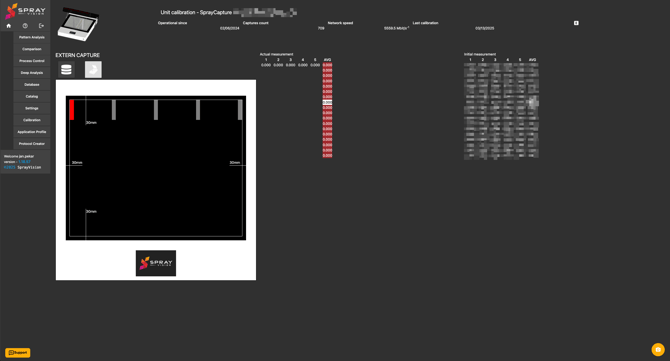
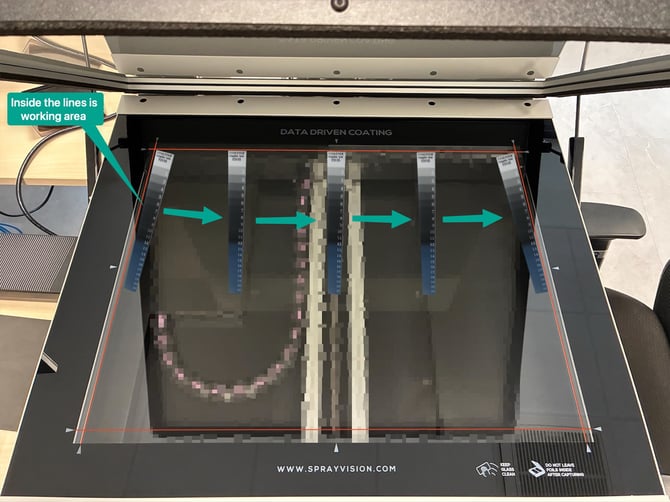
- Displaying Deviation Percentage
The system calculates and displays deviations from the original initial measurement of the Unit calibration reference during unit manufacturing quality check. - Storing the Calibration Curve
Based on the deviations, the calibration curve is automatically stored for future use.
⚠️ IMPORTANT – Calibration is mandatory after replacing the backlight or imaging sensor to ensure optimal performance.
3. Calibration Outputs
The final step of the calibration process generates a repeatability certificate, which serves as a record of the unit’s calibration consistency and quality.
4. Tips for Effective Calibration
-
Ensure the calibration plate is clean and positioned correctly during the process.
- You can see the correct calibration position on the illustration photo above.
- Keep the calibration plate inside of the working area.
- The calibration plate is in the correct position when the text is readable while standing in front of the unit.
- Always follow software prompts to complete each step efficiently.
- Regular inspections and timely re-calibration help extend the life and accuracy of your SprayCapture devices.
If you encounter any troubles during the unit calibration check procedure, please do not hesitate to reach our support at helpdesk@sprayvision.com.