
Unfortunately, by default this new feature blocks the connection between the SprayCapture capturing device and the web browser. Since the Chromium engine (the internal core of Google Chrome) is also used by Microsoft Edge, Opera, Brave, and Vivaldi, the same issue may occur in these browsers as well.
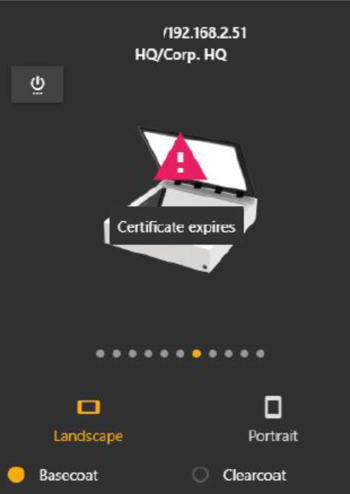
What Does the Error Look Like in the SprayCapture Web App?
It may appear as if a certificate is missing or outdated. Even if you try to update or reinstall the certificate, nothing will likely change – by default, the new browser setting blocks access to the local network.
How to Fix This Issue?
There is a simple step – when you open the SprayCapture web app, the browser should first ask whether you want to allow access to the local network.
Click “Allow” to grant permission, so the browser can detect the SprayCapture device on your local network.
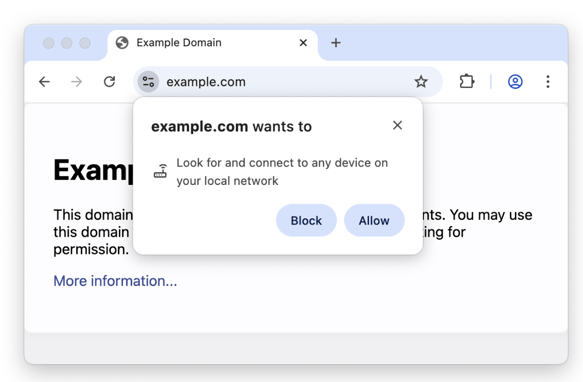
If you have previously clicked “Deny” or “Block”, you will need to change the website settings of your browser.
First, open https://spraycapture.app and navigate to the site settings in your browser.
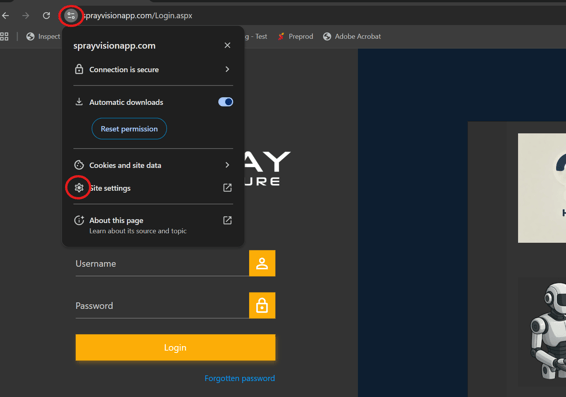
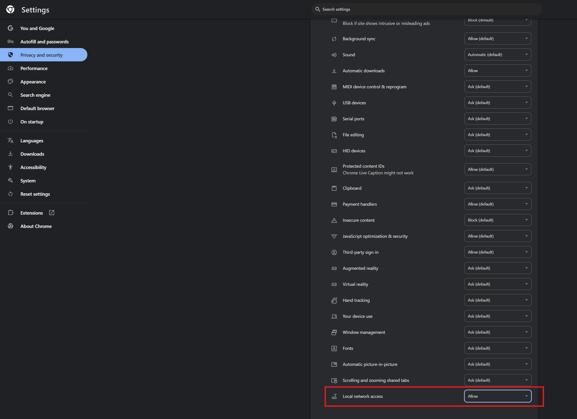
Go through the list of options and find the “Local network access” option and switch it to “Allow”.
ℹ️ If you are a SprayBrush user as well, follow the same steps also on the
https://spraybrush.app site.
ℹ️ The change of the local network access is done based on the domain – this means that if you will change the settings of the https://spraycapture.app and https://spraybrush.app, the rest of the websites will stay blocked or in the way of your own settings.
With the change of this setting, you should be able again to access the SprayCapture device without problems. If your problem persists or if you face any other issues, please do not hesitate to contact us via helpdesk@sprayvision.com.